860-829-2244

To print on plastic with a UV LED flatbed printer, you clean the surface, set the bed height so the printheads clear the part, lay down a white underbase if the plastic is clear or dark, then print and cure in the same pass. The piece comes off the bed dry and handleable. Rigid plastics like acrylic, PVC, ABS and polycarbonate take DCS UV LED ink directly. Low-energy plastics like polypropylene need an adhesion promoter wiped on first.
This guide covers which plastics behave, when you need a promoter, why white ink decides whether your color reads, and how to pick a bed size for the parts you actually run. Every specification below is quoted from a Direct Color Systems product page.
Which plastics take UV ink directly
Direct Color Systems states that its Direct Jet flatbed UV LED printers print directly onto "wood, acrylic, PVC, aluminum, ABS, polycarbonate, glass, crystal, stainless steel, ceramic tile, electrical components, and much more." For plastic, that list is the short answer: acrylic, PVC, ABS and polycarbonate are the four rigid plastics DCS names outright.
The reason is the ink chemistry. The IRF6T White, IRF6, IRF4 and IR2 inks "bind to many different types of substrates without the need for any pre-coating." Nothing gets sprayed on, nothing gets flame-treated, nothing goes in an oven. The UV LED lamps cure the ink as the carriage passes over it, so the bond forms on the surface instead of soaking in.
Two of those four plastics already have a home on this site. Acrylic has its own application page for printed awards and plaques, and PVC is what most printed name badges are cut from.
Which plastics need an adhesion promoter first
Polypropylene and other low-surface-energy plastics are the ones that give shops trouble. Ink beads instead of wetting out, and a print that looks fine on the bed can be scratched off with a thumbnail an hour later.
DCS recommends three different promoters, and the fact that one of them exists only for polypropylene tells you which plastic is the difficult one:
- Low-Odor Adhesion Promoter (product code I-UV-ADHPR2-200, 200 ml bottle)
- Bohle
- Polypropylene Promoter
Each one has its own recommended use, and the DCS tech tip on adhesion promoters carries the application chart as a PDF. The promoter does not change the print. It strengthens the bond between the ink and the substrate, which is a different job from the white underbase described below.
Printing on plastic
Four numbers that decide the job
Quoted from Direct Color Systems product pages
12 in
Thickest substrate the UV-32MP, UV-44DTS and UV-84DTS Gen2 accept
3
Adhesion promoters DCS recommends, one of them polypropylene-specific
8
Ink channels on an F6T Edition printer: C, M, Y, K, Cl, Cl, Wh, Wh
.020 to .060 in
Gauge range of the print-receptive plastic sheet stock DCS sells
Source: directcolorsystems.com model, ink and substrate pages, read 2026-09-30.
How to print on plastic, step by step
- Clean the surface. Handling oil and mold release are the two most common reasons a print fails adhesion on a part that should have worked.
- Wipe on a promoter if the plastic needs one. Polypropylene does. Acrylic, PVC, ABS and polycarbonate generally do not.
- Hold the part still. An integrated vacuum table holds flat sheet in place and is a standard option on the UV-21MP, UV-32MP, UV-44DTS and UV-84DTS Gen2. Shaped parts sit in a jig instead.
- Set the Z height. You drop the table until the printheads clear the tallest point of the part. Crash detection on the MP and DTS models is there to reduce head strikes when that gap is misjudged.
- Print white first on clear or dark plastic. Then color on top, in the same pass.
- Take the part off dry. UV LED curing finishes as the carriage moves, so there is no flash-off time between printing and packing.
White ink is what makes color read on clear and dark plastic
This is the step shops skip, and it is the one that decides whether a job looks right. Printing cyan onto black ABS gets you almost nothing. Printing an opaque white layer onto black ABS and then cyan on top of that gets you cyan.
DCS states that its white UV LED ink "provides an opaque and bright white image, even on dark substrates," and lists printing "durable, bright white on black and other dark colors" for computer, server and router rack-mount products as an application in its own right. On an F6T Edition printer the eight channels are C, M, Y, K, Cl, Cl, Wh, Wh, which is two channels each of clear and white rather than one.
The clear ink is the other half of that. DCS states it adds durability "along with the ability to add different finishes like gloss vs. matte," so a matte control panel and a gloss award can come off the same bed.
Flexible plastic, and why the ink does not crack
Rigid plastic is the easy case. Flexible plastic bends after it is printed, and a brittle ink film splits.
DCS states that its UV LED inks "are very flexible and won't crack or flake off, even in very flexible vinyl applications." It also states that when the F6T white ink and IRF6 CMYK plus clear are used on compatible F6T Edition printers, "cracking and peeling of prints is eliminated or minimized on flexible items like leather belts, printer cables, ribbons, and much more." If you run vinyl electronics skins or printed cable markers, that is the ink set the specification points at.
Plastic stock you can buy already print-receptive
You do not have to source your own sheet and hope. DCS sells plastic sheet stock tested in its own printers:
- Printable PVC sheet at .060" (1.5mm), in white and silver with masking, and gold with no masking.
- PrintMark, a gloss material with an acrylic cap and an ABS core, similar to Rowmark Satins and New Hermes Gravoply 1. Available from 1/16" (1.6mm) down to .060" (1.5mm) gauge, for interior signage, industrial marking and personal identification.
- PrintMark II, a modified acrylic resin similar to the Rowmark Lasermark, Lacquer and Flexibrass lines, in .020" (0.5mm) and .052" (1.3mm). Every product in this line carries a special adhesive with a non-slip liner.
- Pre-cut PVC badge blanks at .060" (1.5mm), with .030" (0.8mm) pre-sized blanks alongside them.
Both PrintMark grades are stated as "fully tested for both full-color and monochrome use in DCS's printers," and both can be rotary engraved, rotary profiled, saw cut, shear cut and beveled after printing. PrintMark II can also be laser engraved and profiled.
Which Direct Jet printer fits the parts you run
Bed size and Z-axis clearance are the two specifications that rule jobs in or out. A tall injection-molded housing needs Z height. A run of flat badge blanks needs bed area. Here is what the four current flatbed UV LED models give you.
UV-21MP, small format
Prints up to 17" x 24" (44cm x 61cm), with a 7" (18cm) Z-axis height. Speed is 4.5 m2/hr, or 48.4 ft2/hr, at 6 pass full bed. It runs Color Byte 12 and Chromasphere print technology in a footprint sized for a smaller shop. UV-21MP specifications.
UV-32MP, intermediate format
Prints up to 24" x 36" (60cm x 90cm) with a fully adjustable descending table that accepts substrates up to 12" (30cm) thick. Speed is 5 m2/hr, or 60 ft2/hr, at 6 pass full bed. This is the smallest model that takes a 12-inch part. UV-32MP specifications.
UV-44DTS, medium format
Prints up to 4' x 4' (130cm x 130cm), 12" (30.48cm) Z-axis height, on Ricoh Gen6 industrial printheads with a smaller drop volume and faster firing frequency. Built on a double gantry system, with a pin registration system for repeat placement. UV-44DTS specifications.
UV-84DTS Gen2, wide format
Prints up to 4' x 8' (120cm x 243cm), the same 12" (30.48cm) Z-axis height, Ricoh Gen6 printheads, double gantry and pin registration. A full 4' x 8' of TEXTUR3D prints in 60 minutes. UV-84DTS Gen2 specifications.
All four also produce raised TEXTUR3D prints and ADA-compliant Braille signage on DCS patented technology, which matters if the plastic you print is interior signage rather than product.
Test the exact plastic before you quote a production run
DCS is direct about this, and it is worth quoting in full: "All substrates should be tested for image receptivity, adhesion and durability, with final acceptance and suitability determined by the customer."
That is the right way to read every adhesion claim, including the ones on this page. "Polycarbonate" is not one material. Two suppliers' sheet can carry different surface treatments, different additives and different release agents, and one will hold ink while the other will not. Print a test piece on the actual stock you are going to buy, then scratch it, solvent-wipe it and leave it in the environment the finished part lives in. Request a printed sample on your own material before a machine decision rests on it.
Jobs that run on plastic every day
DCS lists these plastic applications on its own UV printing page:
- Injection-molded parts
- Microchips, including polypropylene and ceramic
- Dial faces, equipment serial plates and other industrial part marking
- Name badges, photo IDs and luggage tags
- Vinyl electronics skins
- Computer, server and router rack-mount products
- Plaques and awards in acrylic and other materials
- Interior and exterior signage
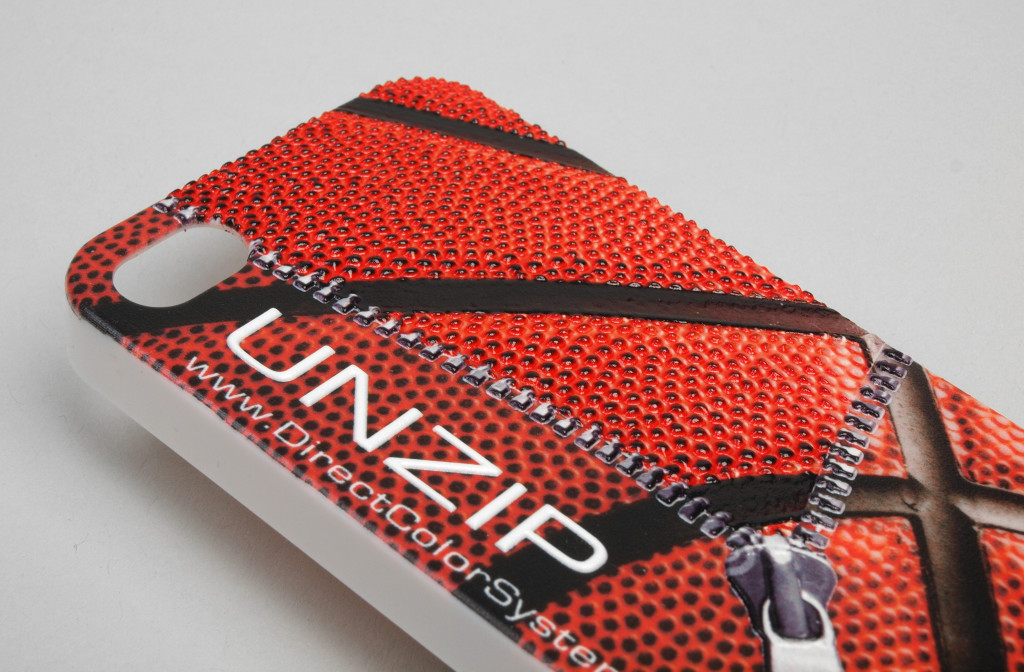
- Cell phone cases and other molded consumer goods
If your substrate mix runs past plastic, the same process applies to harder surfaces with different preparation. There are companion guides for UV printing on metal and printing on glass.
Frequently asked questions
Can you print directly on plastic without a coating?
Yes, on most rigid plastics. DCS states that its IRF6T White, IRF6, IRF4 and IR2 inks "bind to many different types of substrates without the need for any pre-coating," and names acrylic, PVC, ABS and polycarbonate among the materials its Direct Jet flatbeds print directly.
Why does ink rub off polypropylene?
Polypropylene is a low-surface-energy plastic, so ink tends to bead rather than wet out and bond. DCS recommends a dedicated Polypropylene Promoter for it, one of three promoters it lists, alongside a Low-Odor Adhesion Promoter and Bohle.
Do you need white ink to print on black plastic?
Yes, if you want the color to read. An opaque white underbase is printed first and the color goes on top of it. DCS states its white UV LED ink "provides an opaque and bright white image, even on dark substrates," and lists bright white on black rack-mount products as an application.
How thick a plastic part can a UV flatbed print?
Up to 12 inches on the UV-32MP, UV-44DTS and UV-84DTS Gen2, and up to 7 inches on the UV-21MP. The table drops to clear the tallest point of the part.
Will UV ink crack on flexible plastic?
DCS states its UV LED inks "are very flexible and won't crack or flake off, even in very flexible vinyl applications," and that cracking and peeling are "eliminated or minimized" on flexible items when F6T white and IRF6 inks run on compatible F6T Edition printers.
Next step
Send the plastic you actually run. DCS prints a sample on your own substrate, which settles the adhesion question before any printer is specified. Start from the UV printing application page to request one, or compare bed sizes and Z heights across the Direct Jet flatbed range.