860-829-2244

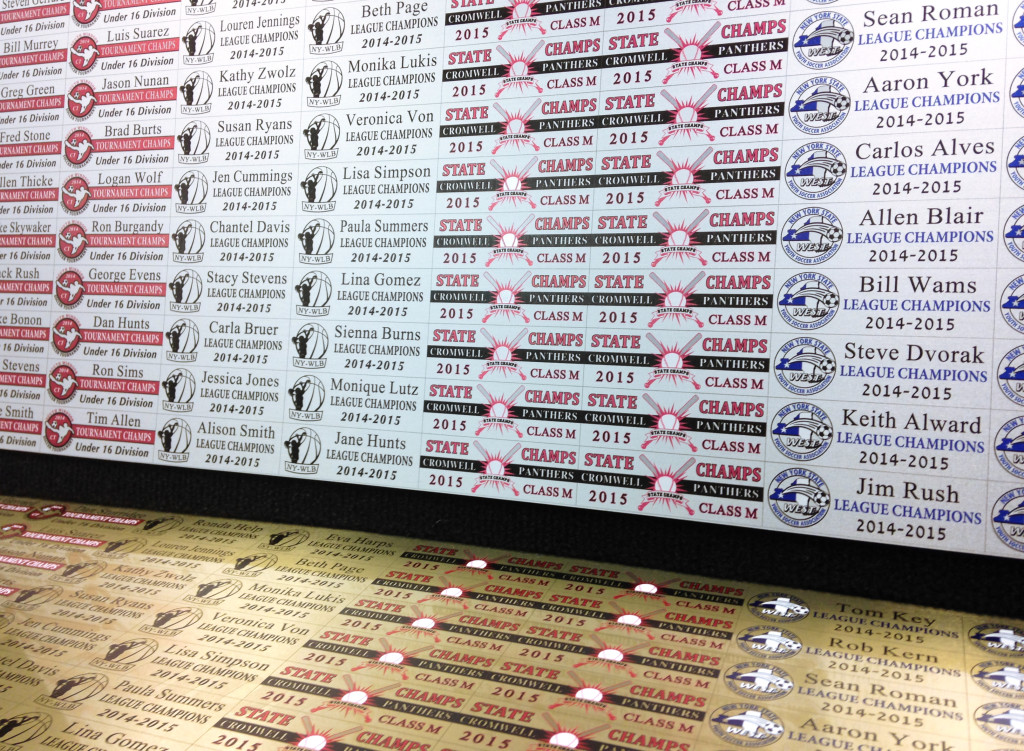
UV printing on metal means jetting UV-curable ink straight onto a bare or coated metal surface and curing it under LED lamps in the same pass. No screens, no plates, no heat press. A direct-to-substrate UV-LED printer lays full-color images, logos, fine text and variable serial numbers onto rigid metals such as aluminum and brass, then hardens the ink on contact, so the plate comes off the bed dry. This guide covers which metals take the ink, how adhesion is handled, what shops actually produce on them, and which Direct Color Systems printer fits the parts you run.
Key Takeaways
- UV printing on metal is direct-to-substrate inkjet: full color straight onto aluminum and brass, cured on contact, with no plates or screens.
- Adhesion is the deciding factor. Print-receptive coatings, InkMark UV metals, and open-pored anodized aluminum each give the ink something durable to bond to.
- Common metal jobs include serial plates, dial faces, machine tags, nameplates, safety signs, plaques, and awards.
- UV-LED runs cooler and uses far less energy than mercury-arc UV, and supports variable data that screen printing and engraving cannot match economically.
- Bed size decides the machine: 17″ × 24″ on the UV-21MP up to 4′ × 8′ on the UV-84DTS Gen2.
What UV printing on metal actually is
Direct-to-substrate UV-LED printing uses inkjet heads to jet tiny droplets of UV-curable ink onto the part, then cures each pass with ultraviolet LED lamps. Because light-emitting diodes replace older mercury-arc lamps, the system runs cool and efficient. A peer-reviewed materials review reports that a UV-LED array consumes 50% to 75% less energy than an equivalent mercury arc lamp, and it credits the elimination of mercury and low process heat for the technology's spread into printing. For a metal shop that means the ink sets the instant it passes under the lamp, so a finished plate comes off the bed dry and ready to handle.
DCS Direct Jet inkjet printers print full-color, photo-quality images, logos, and text directly onto rigid metals such as aluminum and brass. Unlike screen printing, there are no screens to burn and no minimum run to justify the setup. Unlike laser engraving, the mark is full CMYK color rather than a single burned tone. And unlike dye sublimation, the ink goes straight onto the metal rather than requiring a polyester layer to receive a gas-phase dye. Each part can carry a different image, barcode, or serial number without stopping the press. You can see finished examples on the DCS aluminum printing page.
Which metals can you print on?
Aluminum and brass are the workhorses of metal inkjet printing, and aluminum in particular is built to last. The Aluminum Association reports that roughly 75% of all aluminum ever produced is still in use today, and that recycling it takes only about 5% of the energy of primary production. A print that lives on aluminum therefore rides on a substrate that resists corrosion and stays in service for years.
DCS supports metal printing three ways, and the right one depends on how durable the finished part must be.
- Print-receptive metal sheet stock. DCS stocks print-receptive metal sheet stock in .023 inch (0.6 mm) aluminum and .019 inch (0.5 mm) brass. The metal carries a print-receptive plastic layer that both accepts the ink and cushions the print head during printing. It comes in white, brushed gold, and brushed silver aluminum, plus gold satin brass. One production caution: printing on the wrong side of this material can damage the print head, and that damage is not covered under warranty, so keep the coated face up.
- InkMark UV metals. For parts that face solvents or heavy handling, InkMark UV metal substrates produce durable, highly scratch-resistant images with greater resistance to many perfumes and solvents, including 100% isopropyl alcohol, without a chemical wipe or adhesion promoter. They come in white, silver and gold aluminum, in full 24″ × 48″ sheets and 12″ × 24″ quarter sheets, with other thicknesses, colors and custom cuts made to order through DCS customer service. The DCS InkMark UV metal page rates the material outdoor UV stable for up to two years with no overcoat, and the matte finish is ADA compliant.
- Open-pored anodized aluminum. For the most rugged outdoor and industrial parts, a DCS Direct Jet printer can print into open-pored (anodized) aluminum so the color sits below the surface. Sub-surface prints hold up to abrasion, chemicals, and moisture, which is why the method suits data plates, awards, and exterior signage.
How do you make a metal print durable?
Durability on metal comes down to adhesion, and adhesion is where the substrate choice earns its keep. Bare, polished metal gives ink very little to grip, so DCS solves the problem at the coating level. Its InkMark coated substrates are engineered to accept the company's Multisolve dye and clear inks simultaneously in a single pass. The coating catalyzes with the CMYK and clear ink to form a bond that resists many perfumes and solvents, including 100% isopropyl alcohol. That chemical resistance matters for dial faces and control panels that get wiped down every shift.
Where a part will be handled hard or exposed to weather, the open-pored anodized route seals the color beneath the aluminum's own oxide layer, so abrasion wears the metal rather than the image. Because UV-LED ink cures on contact instead of air-drying, there is no long dwell time for dust or fingerprints to spoil the finish before it sets, and a clear ink layer can be laid over the color for added scuff and gloss control.
What you can print on metal: signage, plates, and part marking
Regulation is one reason metal printing keeps growing. The FDA Unique Device Identification rule requires that a reusable medical device intended to be reprocessed before each use carry its unique device identifier marked directly on the device, not only on the packaging. That drives steady demand for permanent, legible marks on metal instruments and trays, and the same need for a durable, human-readable and machine-readable mark shows up across manufacturing.
Typical metal jobs on a DCS Direct Jet printer include:
- Serial plates, data plates, and equipment nameplates
- Dial faces, gauge faces, and control-panel overlays
- Machine tags, asset tags, and industrial labels
- Interior and exterior sign printing, including safety signs
- Desk plates, door plates, and name badges
- Plaques, recognition awards, and trophies
Because the printer handles industrial labeling, dial faces, and serial plate printing as a single digital step, a manufacturer can print short runs, one-off replacements, and variable serial numbers on demand rather than ordering plates in bulk and warehousing them. Adding raised or tactile elements is possible too, through DCS textured printing with TEXTUR3D, which prints raised textures inline for ADA and industrial parts.
Which DCS printer fits your metal work?
The part chooses the printer, not the other way around. Measure the largest plate or sign you run today, then count how many small tags you would want to gang on one bed. The UV-LED printer lineup covers four Direct Jet flatbeds, alongside the VIBRAHue line and the ChromaSphere. All of them are driven by Color Byte RIP, which lays out, tiles and manages variable data across a bed of parts.
Spec comparison
Print area across the four Direct Jet flatbeds
Bed size is the first number to check on a metal job, because it sets the largest plate you can run whole and how many small parts you can gang on one pass.
UV-21MP — 17″ × 24″ bed
408 in²
UV-32MP — 24″ × 36″ bed
864 in²
UV-44DTS — 4′ × 4′ bed
2,304 in²
UV-84DTS Gen2 — 4′ × 8′ bed
4,608 in²
UV-21MP — small format, 17″ × 24″ bed
A 17″ × 24″ (44 × 61 cm) print area with fully adjustable height for stock up to 7″ (18 cm), running 4.5 m²/hr — 48.4 ft²/hr across the full bed at six passes, under Color Byte 12. This is the machine for name badges, desk plates, dial faces and short runs of small serial plates in a shop with no floor space to give up. UV-21MP specifications.
UV-32MP — intermediate format, 24″ × 36″ bed
A 24″ × 36″ (60 × 90 cm) print area and a descending table that takes stock up to 12″ (30 cm) — the same clearance as the two large machines, in a bench-sized footprint. Six-pass speed is 5 m²/hr — 60 ft²/hr full bed. Choose it when the metal part is thick or assembled rather than wide: a gauge in its housing, a tagged casting, a control panel still attached to its bracket. UV-32MP specifications.
UV-44DTS — medium format, 4′ × 4′ bed
A 4′ × 4′ (130 × 130 cm) print area, 12″ (30.48 cm) of Z-axis height and a pin registration system for repeat placement job after job. Pin registration is what makes a metal plate run economical: the jig goes back in the same place every time, so a second color pass or a re-run of the same part lines up without re-setting the file. UV-44DTS specifications.
UV-84DTS Gen2 — large format, 4′ × 8′ bed
A 4′ × 8′ (120 × 243 cm) print area with the same 12″ (30.48 cm) Z-axis height and the same pin registration. This is the model for full-sheet metal signage and for ganging a few hundred small tags across one bed instead of running eight loads. UV-84DTS Gen2 specifications.
All four appear side by side on the flatbed UV printer page.
Because UV-LED lamps run cool and turn on instantly, these printers avoid the warm-up, ozone, and mercury handling of older UV systems. Mercury is a recognized hazard: the U.S. EPA notes that methylmercury exposure can adversely affect the brain and nervous system, part of the broader shift away from mercury-based UV lamps toward LED curing.
UV-LED vs other metal decorating methods
For many shops the question is not whether metal can be decorated, but which method wins on cost and flexibility. Screen printing is efficient for very long, unchanging runs but needs a screen per color and cannot vary the image part to part. Laser engraving is permanent but monochrome, so it cannot reproduce a full-color logo. Dye sublimation delivers color but generally needs a polymer-coated metal to receive the dye. Pad printing suits small curved parts but struggles with fine, full-color detail.
UV-LED direct printing sits between them: full CMYK plus white and clear, no plates or screens, instant cure, and true variable data so every plate can differ. For a run of a few hundred serial plates with sequential numbers, or a batch of mixed nameplates, the digital workflow removes the setup that makes the analog methods expensive on short jobs.
| Method | Full color | Variable data | Setup per job | Best for |
|---|---|---|---|---|
| UV-LED direct | Yes (CMYK plus white and clear) | Yes | None | Short-to-mid runs, serial data, mixed parts |
| Screen printing | Limited (one screen per color) | No | High | Very long, unchanging runs |
| Laser engraving | No (monochrome) | Yes | Low | Permanent single-tone marks |
| Dye sublimation | Yes | Yes | Low | Coated metal photo panels |
If your work spans more than metal, the same UV-LED workflow applies to other rigid materials. Our companion guide to printing on glass walks through the substrate prep and adhesion steps for that surface.
Frequently Asked Questions
Can you print full color directly on aluminum?
Yes. A DCS Direct Jet UV-LED printer jets full-color CMYK ink, plus white and clear, directly onto rigid aluminum and brass, then cures it on contact. The aluminum printing page shows finished examples.
Do you need a special coating or primer to print on metal?
Bare polished metal gives ink little to grip, so DCS offers print-receptive coated metal and InkMark UV metals that bond durably without a separate chemical wipe or adhesion promoter. Open-pored anodized aluminum is another route for sub-surface, weather-resistant prints.
How durable is a printed metal plate?
Durability depends on the substrate. InkMark UV metals resist many perfumes and solvents, including 100% isopropyl alcohol, and open-pored anodized prints hold up to abrasion, chemicals, and moisture, which suits outdoor and industrial use.
Can UV-LED printers handle serial numbers and part marking?
Yes. Variable data is a core strength: each plate can carry a unique serial number, barcode, or image in the same run, which supports part-marking and traceability requirements.
What metal thickness can DCS printers print on?
DCS stocks print-receptive aluminum at .023 inch (0.6 mm) and brass at .019 inch (0.5 mm), in 8 x 12 inch sheets and 12 x 24 inch quarter sheets. InkMark UV metal comes in full 24 x 48 inch sheets and quarter sheets, with other thicknesses cut to order through DCS customer service. Confirm the material and the print side before you run: printing the wrong side can damage the head.
The honest way to settle a metal job is to print one. Send Direct Color Systems the plate, tag or sign you are quoting and ask for a printed sample on that exact stock, or sit in on an upcoming web demo to watch a Direct Jet run before you shortlist a bed size. Both start on the DCS contact page. If aluminum is the substrate you keep coming back to, the aluminum printing page carries the finished work.